
Basic Overview of MIDI Channels
What Are MIDI Channels?
A single MIDI connection can carry 16 separate MIDI channels.
Each channel is an independent stream of musical information.
This means you can have up to 16 different “conversations” happening at the same time over one MIDI port, with each channel controlling a different instrument or sound.
You can think of MIDI channels as separate lanes that keep musical data organised and prevent different instruments from interfering with each other.
Using MIDI Channels to Control Multiple Devices
Routing MIDI with ChordWalk
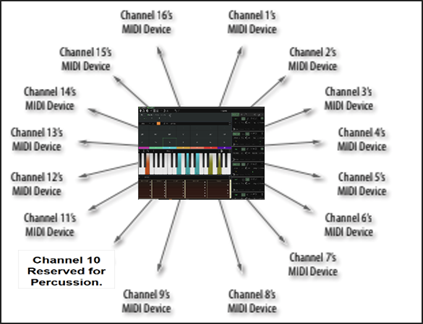
ChordWalk allows you to route MIDI data created in any Creation Area and send it on any of the 16 MIDI channels available on a MIDI port.
By setting each MIDI device or virtual instrument to listen to only one specific channel, you can:
Control different virtual instruments in your DAW independently
Send separate MIDI streams to multiple SF2 sound samples at the same time
Play multiple independent sounds on a hardware or software synthesiser
Each instrument responds only to the MIDI data sent on its assigned channel.
Playing Multiple Sounds with Multitimbral Devices
What Does “Multitimbral” Mean?
A multitimbral MIDI device is one that can play multiple different sounds at the same time, with each sound responding to a different MIDI channel.
For example:
Channel 1: Piano
Channel 2: Guitar
Channel 3: Bass
All of these sounds can play simultaneously from a single device.
General MIDI Channel Convention
In General MIDI:
Channels 1–9 and 11–16 are used for standard instrument sounds
Channel 10 is reserved for percussion
Each note number on Channel 10 triggers a different drum or percussion sound
MIDI Channels and MIDI Ports
MIDI channels operate within MIDI ports.
A MIDI port is the entry and exit point for MIDI data
Each MIDI port supports up to 16 MIDI channels
The 16-channel limit is a core part of the MIDI standard
Using Virtual MIDI Ports
You can create multiple virtual MIDI ports using tools such as LoopMIDI (a free utility).
Each virtual MIDI port provides another set of 16 MIDI channels, allowing you to greatly expand the number of instruments you can control.
When using ChordWalk for Windows with a DAW on the same computer, it is recommended to set up virtual MIDI ports.
The ChordWalk Creator’s Guide explains how to do this step by step.
Multitimbral vs Polyphony
Multitimbral (What Sounds You Can Play)
Multitimbral refers to how many different sounds a device can play at once.
Example: A synth playing piano, strings, and bass at the same time
Each sound uses a different MIDI channel
Polyphony (How Many Notes You Can Play)
Polyphony refers to how many notes a device can play simultaneously.
A device with 64-note polyphony can play up to 64 notes at once
A device with 32-note polyphony can play up to 32 notes at once
Polyphony affects how complex your music can be before notes start dropping or cutting off.
Summary
A MIDI port carries 16 independent MIDI channels
Each channel controls a separate musical part
Multitimbral devices use multiple channels to play different sounds at once
Polyphony determines how many notes can play at the same time
Virtual MIDI ports allow you to expand beyond 16 channels
Understanding MIDI channels is essential for organising instruments, avoiding conflicts, and creating clean, predictable musical performances.